Introduction
How many times have you written the same CRUD controller for yet another table?
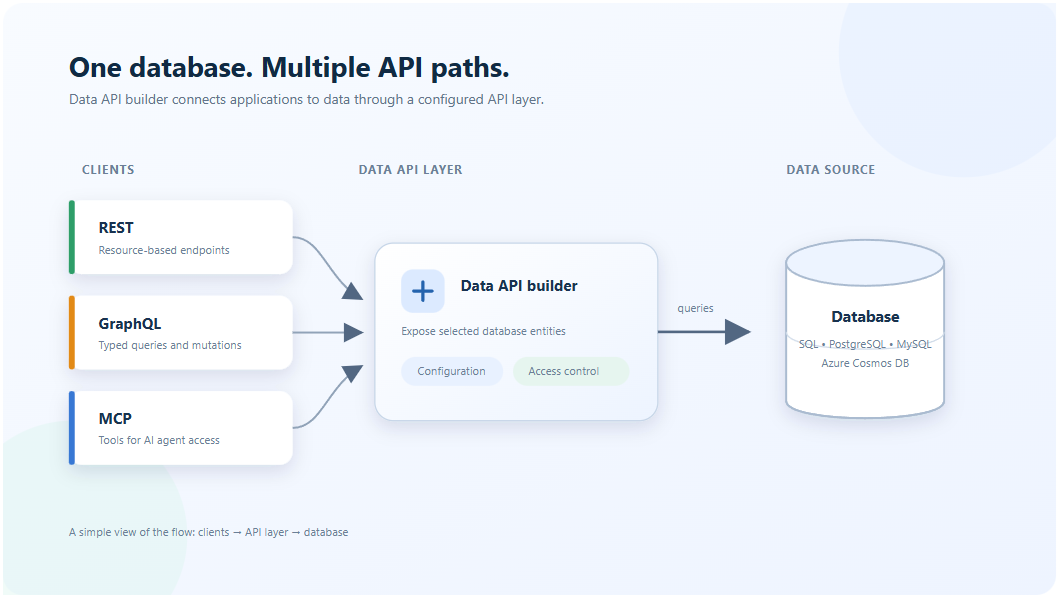
What if your database could serve REST, GraphQL and MCP endpoints without you writing a line of code?
Data API builder (DAB) answers both questions. It turns a database into secure REST, GraphQL and MCP endpoints from one JSON config file, with no API code to write or maintain.
Most data-backed apps start the same way: a table, then a controller, a DTO, a repository, validation, auth checks, paging, filtering, and tests for all of it. Multiply that by every table and every new client, including the AI agents that now want to read your data too. That boilerplate is where the weeks go, and where security bugs hide.
In this post I walk through what Data API builder is, how it works, how to get a working API in a few minutes, and why its newest feature, SQL MCP Server, may be the most interesting way yet to let AI agents near production data.
What is Data API builder?
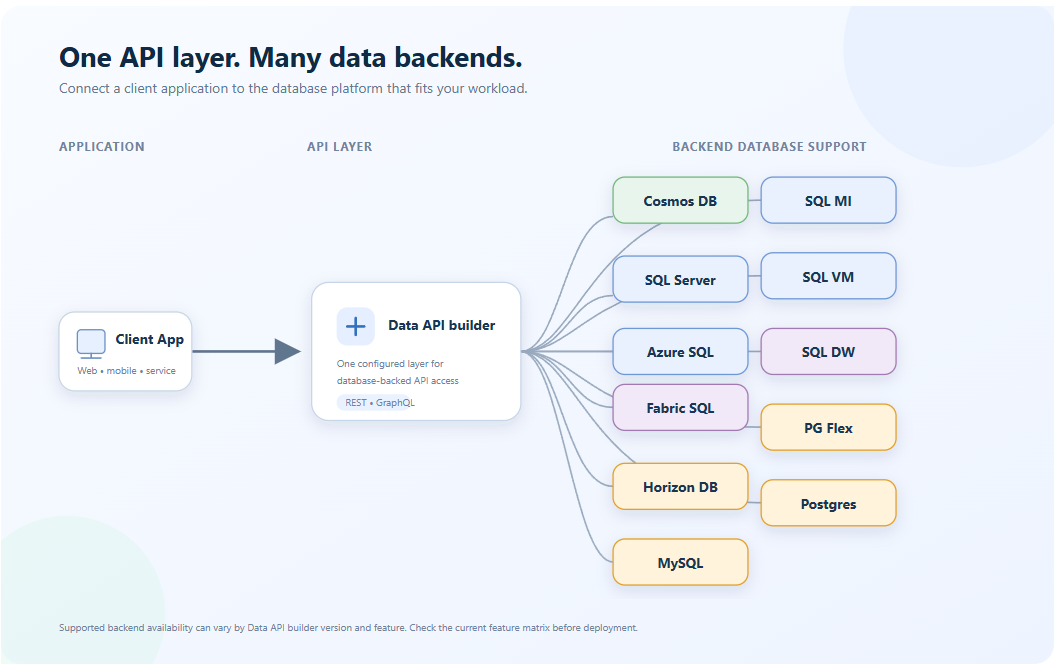
Data API builder is an open source, configuration-based engine from Microsoft that generates REST, GraphQL and MCP endpoints over your database. It is MIT licensed, free, has no premium tier, and runs stateless anywhere: Azure, another cloud, or on premises.
You describe what to expose in one JSON file. DAB reads that file at startup and serves the API. There is no generated code to check in and nothing to keep in sync by hand.
| Area | What you get |
|---|---|
| Endpoints | REST (/api), GraphQL (/graphql) and MCP (/mcp), all at once |
| Databases | Azure SQL and SQL Server, Azure Cosmos DB, PostgreSQL, and MySQL |
| Multiple sources | Several databases behind one API, relational and NoSQL, cloud and on premises |
| Query features | Paging, filtering, sorting, column selection, relationships, stored procedures, aggregation |
| Docs and tooling | OpenAPI/Swagger for REST, Nitro for GraphQL, a cross-platform CLI |
| Hosting | Azure Container Apps, App Service, AKS, Container Instances, or any Docker host |
How it works
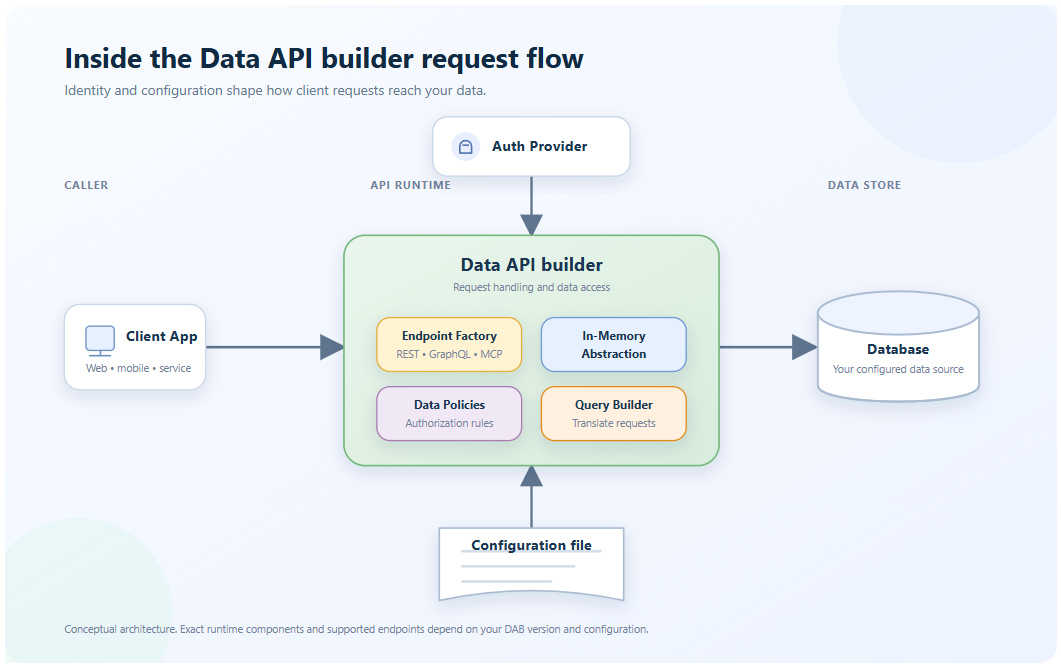
DAB sits between your database and your callers as an abstraction layer. The database defines tables, views, and stored procedures. The config file projects the ones you choose into entities, and DAB serves those entities the same way on every endpoint.
In the config file you define four things:
- The data source: database type and connection string, ideally from an environment variable or Azure Key Vault.
- The entities: which tables, views and stored procedures are exposed, and under what names.
- The shape: aliased columns, included or excluded fields, and relationships, including virtual ones the database does not declare.
- The permissions: which roles may create, read, update, delete or execute each entity, plus row-level policies.
A minimal entity looks like this:
{
  "entities": {
    "Book": {
      "source": "dbo.books",
      "permissions": [
        { "role": "anonymous", "actions": [ "read" ] }
      ]
    }
  }
}
That block alone gives you GET /api/Book, a books query in GraphQL, and read access through the MCP tools. Because callers see entity names rather than table names, you can refactor the database without breaking clients.
Quick start: from zero to API in five commands
You need the .NET SDK and a database you can connect to. A free-tier Azure SQL database or a local SQL Server container both work.
1. Install the CLI
dotnet tool install microsoft.dataapibuilder -g2. Create the config file
dab init --database-type mssql \
  --connection-string "@env('SQL_CONNECTION_STRING')" \
  --host-mode development
3. Add an entity
dab add Book \
  --source dbo.books \
  --permissions "anonymous:read" \
  --description "Books in the catalog, with title, author and year"
4. Start the engine
dab start5. Call it
curl "http://localhost:5000/api/Book?\$filter=year%20gt%202020&\$orderby=title"In development mode you also get Swagger UI at /swagger and the Nitro GraphQL playground at /graphql.
Skip step 3 with auto-config
Have dozens of tables? DAB 2.0 can expose them by pattern instead of one by one. Patterns are re-evaluated at every startup, so new matching tables appear without config changes.
dab auto-config my-def \
  --patterns.include "dbo.%" \
  --patterns.exclude "dbo.internal%" \
  --permissions "anonymous:read"

dab auto-config-simulate   # preview what matches before you commit
In 2.0, auto-config works with tables in SQL Server and Azure SQL. For other databases, add entities manually.
Built for production, not just demos
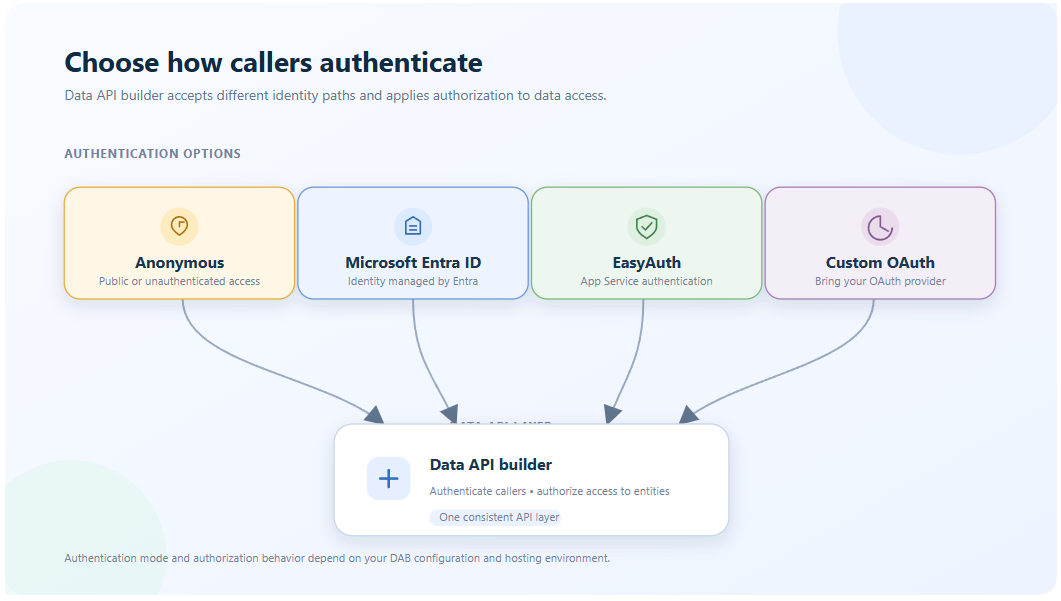
Generated APIs earn a bad name when they stop at CRUD. DAB ships the parts teams usually build last, and they apply equally to REST, GraphQL and MCP.
Security
- Authentication providers: Microsoft Entra ID, any custom JWT issuer (Okta, Auth0, Keycloak), App Service EasyAuth, a simulator for local testing, and the new Unauthenticated default for when DAB sits behind a trusted front end.
- Role-based access per entity: each role gets its own actions and its own included or excluded fields.
- Role inheritance (2.0): permissions flow from anonymous to authenticated to named roles, so you define them once. Run
dab configure --show-effective-permissionsto see what each role can do. - Database policies: row-level filters such as
@item.OwnerId eq @claims.userId, and claims passed into the SQL session context. - On-Behalf-Of auth (2.0): for SQL Server and Azure SQL, DAB swaps the caller's Entra ID token for a database token, so the database sees the real user. That is especially useful for row-level security and for auditing what an AI agent did on whose behalf.
- Permission-aware OpenAPI (2.0): the OpenAPI document shows only what a caller is allowed to call.
Performance
- In-memory (level 1) caching and distributed (level 2) caching, configurable per entity
- HTTP response compression for REST and GraphQL (2.0)
- Keyless PUT and PATCH when the database generates the key (2.0)
Observability
- OpenTelemetry traces and metrics, prewired by
dab initin 2.0, covering MCP tool calls as well as API requests - Application Insights, Azure Log Analytics, and file log sinks
- A
/healthendpoint with per-entity checks and response-time thresholds
Configuration hygiene
- Secrets from environment variables (
@env()) or Azure Key Vault (@akv()) - Hot reload of the config file during development
- REST paths with subfolders, like
/api/invoice/item(2.0)
No comments found.